
 By
AI Clipping With Ssemble: Long Videos to Shorts (2026)
How to turn YouTube videos and podcasts into Shorts, Reels and TikToks with Ssemble's AI clipping: steps, pricing, UK and Australia notes, and limits.
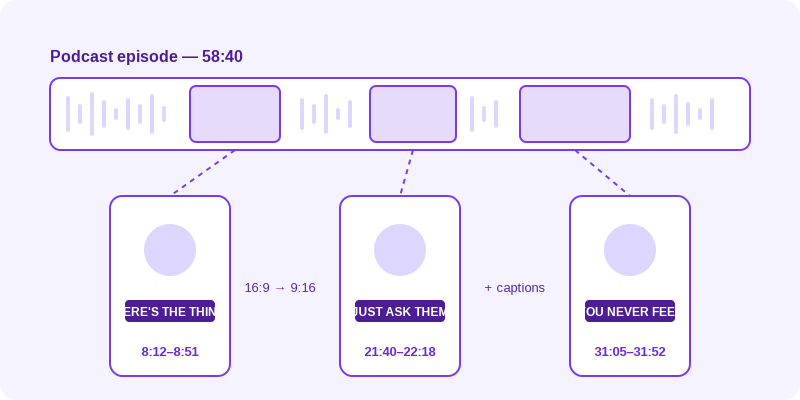
Ssemble is a paid AI clipping service that turns one long video into a batch of short vertical clips. You paste a YouTube link or upload a file and choose up to 20 minutes of it. Its AI then picks the strongest moments, reframes them to 9:16 around the speaker's face, adds animated captions and a hook title, and can schedule the clips to TikTok, YouTube Shorts, Instagram and X. Plans start at $6 a month billed yearly, in US dollars, and one credit clips one 20-minute segment.
This guide covers the whole workflow for creators in the US, the UK and Australia: how AI clipping works, how to set Ssemble up, what it costs once you pay in pounds or Australian dollars, where it falls short, and the copyright and disclosure rules in each country.
Disclosure: this guide contains a paid link to Ssemble. Alventra earns a commission if you subscribe through it, at no extra cost to you. Ssemble did not review or approve this article. The prices and features below come from Ssemble's public pages, checked on 22 November 2026.
Ssemble at a Glance
| Question | Answer |
|---|---|
| What goes in | A YouTube link or an uploaded video |
| How much one credit covers | One video segment of up to 20 minutes |
| What comes out | A batch of vertical 9:16 clips; Ssemble says 10 or more per video |
| Editing it does for you | Face tracking, animated captions, auto zooms and transitions, AI hook titles |
| Caption translation | 30+ languages |
| Posting | Download, or schedule to TikTok, YouTube Shorts, Instagram and X |
| Cheapest plan | Pro: $6 a month billed yearly ($72), 360 credits a year |
| Monthly billing | $15 a month for Pro |
| Currency | US dollars |
| Free plan | None listed on the pricing page |
| Cancelling | Any time; access runs to the end of the paid period |
Sources: Ssemble pricing and Ssemble AI clipping.
What Is AI Clipping?
AI clipping is software that reads or watches a long video, finds the moments most likely to hold a viewer, and cuts them into short vertical clips ready for Shorts, Reels and TikTok.
Done by hand, the job has six steps: watch the whole video, note timestamps, cut each clip, crop from widescreen to vertical, add captions, then export and post. For a one-hour podcast that is several hours of work.
AI clippers compress those steps into one upload:
- Transcribe. Speech is turned into text with word-level timing.
- Pick moments. The model scores stretches of the video for hooks, emotional peaks and complete thoughts. Ssemble says its AI spots "viral moments, emotional peaks, and engagement spikes".
- Reframe. Widescreen footage is cropped to 9:16, and face tracking keeps the speaker in the middle of the frame.
- Dress each clip. Captions, zooms, transitions and a hook title for the first seconds are added automatically.
What the AI cannot judge is context. It does not know that a joke depends on something said ten minutes earlier, or that a cut makes a guest seem to say the opposite of what they meant. Every AI clip still needs a human check before it goes out.
How to Clip a YouTube Video With Ssemble
Step 1: Choose the 20 minutes worth clipping
One Ssemble credit covers up to 20 minutes of a video. With a 60-minute podcast you either spend three credits or pick the best 20 minutes, so it pays to know where the good moments are first.
Copy the transcript from YouTube (open the video's description and click Show transcript), then paste it into the free AI Clipping Tool. It lists the strongest clip moments with timestamps and explains why it chose each one. For transcripts over 20 minutes, it also marks the 20-minute segment that holds the most strong clips. The tool runs in your browser, and the transcript is not uploaded.
Step 2: Create a Ssemble account
Sign up for Ssemble. The AI clipping page invites you to try it free, but neither it nor the pricing page says how many clips that covers. Run one video through before you pay for a year.
Step 3: Paste the link or upload the file
Paste a YouTube URL, or upload the recording if the video isn't on YouTube yet, such as a podcast you recorded on Zoom or Riverside. Then select the segment you found in Step 1.
Step 4: Let the AI build the clips
Ssemble starts analysing as soon as the video is in. It returns a set of clips, each with captions, effects and a hook title already applied.
Step 5: Review every clip
This is the step people skip, and it is where most bad clips come from. For each clip, check that:
- The first two seconds make sense on their own. If the hook depends on earlier context, trim the start or drop the clip.
- Names and brand words are spelled correctly in the captions. Speech-to-text often gets them wrong.
- The ending lands. A clip that stops mid-sentence feels broken; extend it to the end of the thought.
- The reframe follows the right person. On a two-person podcast shot on one wide camera, face tracking can pick the listener instead of the speaker.
Step 6: Download or schedule
Download the clips to post by hand, or connect your accounts and let Ssemble schedule them. Pro connects one social account, Expert three, and Business and Custom unlimited. If you run a TikTok, a YouTube channel and an Instagram account, Pro will only post to one of them.
Ssemble Pricing in 2026
| Plan | Monthly billing | Yearly billing, per month | Charged per year | Video credits per year | Cost per video, yearly | Social accounts |
|---|---|---|---|---|---|---|
| Pro | $15 | $6 | $72 | 360 | $0.20 | 1 |
| Expert | $30 | $12 | $144 | 840 | about $0.17 | 3 |
| Business | $60 | $24 | $288 | 1,800 | $0.16 | Unlimited |
| Custom | $100 | $40 | $480 | 2,600 | about $0.18 | Unlimited |
Prices are from Ssemble's pricing page on 22 November 2026, in US dollars. The yearly credit totals for Expert, Business and Custom include bonus credits (120, 360 and 600). Cost per video is the yearly charge divided by yearly credits.
Three things in the fine print matter:
- Credits don't roll over. They reset every billing cycle, so a plan bigger than you need wastes money.
- Custom costs more per credit than Business. You pay for the extra volume, not a better rate.
- Pro is 30 credits a month on average, which is one 20-minute segment a day.
Paying From the UK or Australia
Ssemble shows prices only in US dollars, so buyers in the UK and Australia pay whatever their bank converts the charge to. Many UK and Australian cards also add a foreign transaction fee, often around 3% of the amount. A card without foreign transaction fees avoids it.
A yearly plan is one charge, so you take one exchange rate for the whole year instead of twelve. The pricing page doesn't say whether UK VAT or Australian GST is added, so check the total at checkout before you confirm.
Where Ssemble Falls Short
No AI clipper suits every channel. Before you commit, weigh these limits:
- 20 minutes per credit. A two-hour podcast takes six credits to cover in full.
- Vertical first. The pages only name the vertical 9:16 format. If you need square or widescreen clips, test an export first.
- No free plan on the pricing page, and the free trial's size isn't stated.
- Self-reported numbers. "3.4M+ creators" and a 4.6 out of 5 rating appear on Ssemble's own site, without a method. User reviews elsewhere are mixed, and many "best AI clipper" comparisons that rank Ssemble first are published on Ssemble's own blog.
- Conflicting language claims. One Ssemble page says captions work in 100+ languages; the pricing page and others say 30+.
- A template look. Auto captions and effects can look the same as every other AI clip. If your brand has its own fonts and colours, budget time to restyle them.
Ssemble vs Clipping by Hand
| Task | By hand in an editor | With Ssemble |
|---|---|---|
| Finding moments | Watch the whole video | The AI ranks moments for you |
| Vertical crop | Keyframe the crop yourself | Automatic face tracking |
| Captions | Auto-caption, then style each clip | Animated captions applied |
| Hook title | Write and place it | Generated, editable |
| Posting | Upload to each app | Scheduled from one calendar |
| Cost | Your time plus editing software | From $72 a year |
Clipping by hand still wins when you post one or two clips a week, when your style is very specific, or when your show uses several cameras and you want to choose the angle for every line. AI clipping wins on volume: a daily podcast or a stream you want to turn into 20 or 30 clips a week.
Posting Across US, UK and Australian Time Zones
Ssemble says it schedules posts for "best performing times". If your audience is split across the three countries, keep in mind how far apart their evenings are:
| Time of year | New York | London | Sydney |
|---|---|---|---|
| November to mid-March | 7:00 pm (EST) | 12:00 am (GMT) | 11:00 am next day (AEDT) |
| April to late October | 7:00 pm (EDT) | 12:00 am (BST) | 9:00 am next day (AEST) |
No single time is evening in all three. Check where most of your viewers are (YouTube Studio > Analytics > Audience shows top geographies) and schedule for that country's evening. If the split is close to even, alternate posting slots between a US evening and a UK evening, which is early morning in Sydney.
Can You Clip Other People's Videos?
Clipping your own videos needs no one's permission. Clipping someone else's does, unless a copyright exception covers what you're doing, and the exceptions differ by country:
- United States: fair use. Courts weigh four factors, including the purpose of the use, how much is taken and the effect on the original's market. It is decided case by case. See the US Copyright Office's fair use page.
- United Kingdom: fair dealing. There is no general fair use. The exceptions cover set purposes such as criticism, review, quotation and news reporting. See GOV.UK: exceptions to copyright.
- Australia: fair dealing. Also limited to set purposes, including research or study, criticism or review, parody or satire, and reporting news. See the Australian Copyright Council's fair dealing guide.
Reposting another creator's best minute with captions on top is unlikely to fit any of these. Many streamers and podcasters run clipping programs that grant permission and pay per view; read their terms, which usually set rules on credit and length. YouTube can also refuse to monetize channels built on reused content, even when the owner allowed the reuse.
Disclose Paid Clips and Links
If a creator or brand pays you to clip or promote something, say so in the post:
- US: the FTC's Endorsement Guides FAQ expects a clear disclosure next to the endorsement, not hidden in a profile.
- UK: the ASA expects affiliate and paid content to be obviously labelled, for example with "#ad" up front. See its affiliate marketing guidance.
- Australia: the ACCC treats undisclosed paid endorsements as potentially misleading under the Australian Consumer Law.
Tips for Better AI Clips
- Record clean audio. Transcription drives moment-picking and captions, so a cheap lavalier or USB microphone improves both.
- Keep faces in frame. Face tracking needs a visible face. For two-person shows, a camera per person reframes far better than one wide shot.
- Answer first, explain second. Clips start where an idea starts. If you open answers with the conclusion, every answer becomes a usable hook.
- Fix captions before posting. One misspelled guest name in giant animated text is the fastest way to look careless.
- Add your own call to action. End clips with where to watch the full episode, because the AI hook title won't know.
- Test lengths. Shorts can run up to 3 minutes for vertical or square videos uploaded from 15 October 2024, according to YouTube Help. Try 30-second and 60-second cuts of the same moment and compare retention.
Frequently Asked Questions
Is Ssemble free?
Ssemble's pricing page lists no free plan. Its AI clipping page offers to try the tool free, without saying how many clips that includes. Paid plans start at $6 a month billed yearly ($72) or $15 on monthly billing.
How much does Ssemble cost in pounds or Australian dollars?
Ssemble charges only in US dollars, so the amount in pounds or Australian dollars depends on your bank's exchange rate on the day, plus any foreign transaction fee on your card. Check the pricing page in USD and convert at your bank's current rate.
How long can a video be in Ssemble?
The video itself can be longer, but one credit clips a segment of up to 20 minutes. From a 60-minute video you select 20 minutes, or spend more credits to cover the rest.
Which platforms can Ssemble post to?
TikTok, YouTube Shorts, Instagram and X, according to Ssemble's pages. Pro connects one account, Expert three, and Business and Custom unlimited.
Does Ssemble add a watermark?
Ssemble's pricing and AI clipping pages don't mention a watermark either way. Export a test clip during your trial and check it before relying on it.
How do I find the best moments before using Ssemble?
Paste the video's transcript into the free AI Clipping Tool. It ranks clip moments by hooks, questions, numbers and story openers, gives exact timestamps, and marks the best 20-minute segment of longer videos so you spend one credit instead of three.
Is AI clipping worth it for a small channel?
If you publish at least one long video or podcast a week and want daily short-form posts from it, the $72 Pro plan costs about what a freelance editor might charge for an hour or two of work. If you post a clip or two a week, a free editor and the clip finder may be enough.