
 By
PDF Too Large to Upload? How to Shrink It
A portal rejected your PDF for being too big. Find out what is making the file heavy, then pick the fix that works for scans, exports and long documents.
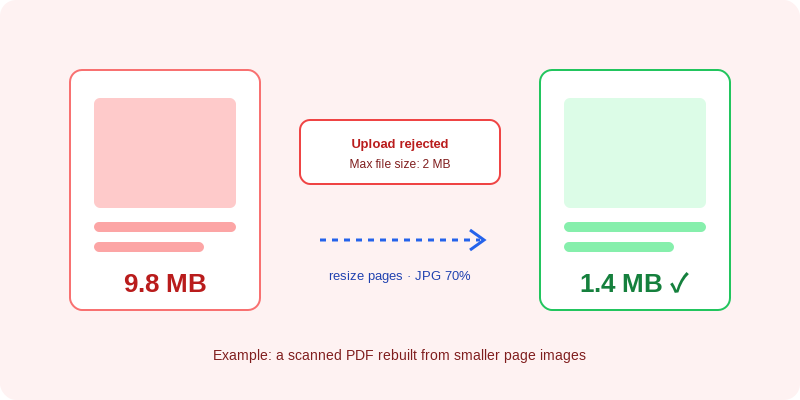
You fill in a long application, attach your documents, press upload, and get a red line: "File size must not exceed 2 MB." The deadline is tonight and the PDF is 9 MB.
The usual advice is "run it through a compressor". Sometimes that works. Often it doesn't, because a compressor can only remove the kind of weight it knows about. The quickest way to get under the limit is to work out what is actually making your file heavy, then use the fix that matches.
First, Find Out Why the PDF Is Big
A PDF is a container. Most of its size comes from one of four things:
- Scanned pages. Each page is a photo of paper. A phone scan of a single A4 page can weigh as much as a long report typed in Word.
- Photos dropped into a document. A brochure or CV with a picture straight off a phone camera carries every one of those megapixels, even if the picture is printed the size of a stamp.
- Embedded fonts and leftovers. Exported files carry font data, and files that have been edited and re-saved many times can carry old objects and metadata nobody needs.
- Too many pages. Sometimes the file is fine and there is simply more of it than the portal wants.
A 10-second test tells you which case you're in. Open the PDF and try to select a word with your cursor. If you can highlight the text, it is a digital document. If the whole page selects like a picture, or nothing selects at all, it is a scan, and the pages are images.
If It's a Digital Document: Re-Save It Leaner
Files exported from Word, Google Docs or design software are mostly text and vector shapes. Their extra weight tends to sit in the file's structure: duplicated objects, metadata, and the way objects are packed.
Our Compress PDF tool rebuilds the file from its pages, packs its objects into compressed object streams and clears the title, author and producer fields. It runs in your browser, so the PDF is not uploaded anywhere, and it shows the old size, the new size and the percentage saved before you download.
Be realistic about what this does. It does not re-encode the images inside the PDF. On a lean export you might only save a few percent; on a file that has been edited and re-saved many times the saving can be larger. If the number barely moves, your weight is in the images, so go to the next section.
On a Mac you have a second option built in. Open the PDF in Preview, choose File > Export, and pick Reduce File Size from the Quartz Filter menu, as described in Apple's Preview guide. This one does shrink images, sometimes aggressively, so zoom in on the result before you send it.
If you still have the original Excel or PowerPoint file, Microsoft's Save as PDF dialog offers an "Optimize for: Minimum size (publishing online)" choice for those apps, according to Microsoft's PDF export help. Re-exporting from the source is almost always cleaner than squeezing the finished PDF.
If It's a Scan: Rebuild It From Smaller Images
Scanned PDFs are where most "too large" errors come from, and a structural compressor can't fix them. What fixes them is fewer pixels per page.
Here's the useful number. An A4 page is 8.27 × 11.69 inches. Scanned at 150 DPI it becomes about 1,240 × 1,754 pixels, which is plenty for printed text to stay sharp on screen. At 200 DPI it is about 1,654 × 2,339 pixels, a safe choice for small print and stamps. A modern phone camera captures around 3,000 × 4,000 pixels, so a phone scan often carries three to six times the pixels the portal will ever need.
To rebuild a scan:
- Get the pages as images. If you scanned with your phone, you probably still have the photos. If you only have the PDF, take a screenshot of each page at a zoom level where the text is crisp.
- Resize them. Use the Image Resizer to bring each page to roughly 1,240 to 1,654 pixels wide, keeping the aspect ratio locked.
- Compress them. Run the pages through the Image Compressor. It saves them as JPG at the quality you choose (30%, 50%, 70% or 90%) and shows the new size of each file. 70% is a good starting point for text.
- Put them back together. Load the pages into Images to PDF in the right order and download a fresh PDF.
This route takes a few minutes, and it works where compressors fail because you remove pixels instead of hoping the compressor finds something to remove.
If you can rescan, do it at the right settings in the first place: 150 to 200 DPI, and grayscale for text documents. A colour scan of a black-and-white letter stores three channels of almost nothing.
If It's Just Too Long: Remove or Split Pages
Look at what is in the file. Application packs often include an instruction sheet, a blank back page from double-sided scanning, or the same certificate twice. The Remove PDF Pages tool lets you click the pages you don't want and download the rest.
If every page has to go and the portal accepts several uploads, split the document instead. Split PDF extracts page ranges or puts every page in its own file, so a 12-page bundle can go up as "Part 1, pages 1 to 6" and "Part 2, pages 7 to 12".
Which Fix Should You Try First?
| What you have | Try this first | Then |
|---|---|---|
| Exported from Word, Docs or a design app | Re-export from the source file | Compress PDF |
| A file edited and re-saved many times | Compress PDF | Mac Preview's Reduce File Size |
| Phone or scanner scans | Rebuild from resized, compressed images | Rescan at 150 to 200 DPI in grayscale |
| A document with big photos inside | Replace the photos with resized copies and re-export | Mac Preview's Reduce File Size |
| A long bundle | Remove pages you don't need | Split into parts |
Read the Limit Carefully
Three details trip people up at the last step:
- Per file or in total? "Maximum 5 MB" sometimes means 5 MB across every attachment on the form. Add up your files.
- Megabytes aren't always the same size. Some systems count 1 MB as 1,000,000 bytes and others as 1,048,576. Windows reports sizes in the larger unit, so a file it calls 1.95 MB is about 2.04 million bytes. Aim for 10% under the limit and you'll never hit the edge case.
- The format matters too. Many portals reject password-protected PDFs and some refuse anything that isn't a PDF, so don't zip the file to make it smaller.
Check the File Before You Submit
A small PDF that nobody can read gets you rejected just as surely as a big one. Before uploading, open the new file and zoom to 100% on the smallest print on the page: reference numbers, stamps, signatures, the fine print on a certificate. If anything is fuzzy, go back one quality step. Keep the original too. You can always shrink a good file again, but you can't add detail back to a crushed one.
Frequently Asked Questions
How do I reduce a PDF to under 1 MB or 2 MB?
First check whether the pages are scans. For scans, resize the page images to about 1,240 to 1,654 pixels wide, save them as JPG at 70% quality and rebuild the PDF. For digital documents, re-export from the source file or use a PDF compressor. Remove any pages you don't need.
Why did my PDF compressor barely change the file size?
Structural compressors rebuild the file and remove metadata, but they don't re-encode the images inside it. If the weight is in scanned pages or photos, you need to reduce the pixels in those images.
Does compressing a PDF reduce its quality?
Rebuilding a PDF's structure doesn't change how pages look. Reducing image resolution or JPG quality does, so check the smallest text on the page after you shrink a scan.
Is it safe to shrink a PDF online?
It depends on where the processing happens. Many online compressors upload your file to their servers. Browser-based tools such as Alventra's Compress PDF process the file on your own device, which matters for IDs, bank statements and contracts.