
 By
Smallpdf and iLovePDF Alternatives That Work Offline
Hit a free-use limit or need PDF tools without internet? What 'offline' really means, and how PDFsam, PDF24, Stirling-PDF and browser tools compare.
People usually go looking for a Smallpdf or iLovePDF alternative at one of two moments. Either the site has just told them they've reached the free limit, or they're about to upload something private (a payslip, a passport scan, a client contract) and stop to wonder where that file is going.
A third group needs tools that keep working with a patchy connection, on a train, at a site office or in a country where the internet drops every afternoon.
All three are really asking the same question: which PDF tools run on my own machine? The answer depends on what you mean by "offline", so let's start there.
What "Offline" Really Means for PDF Tools
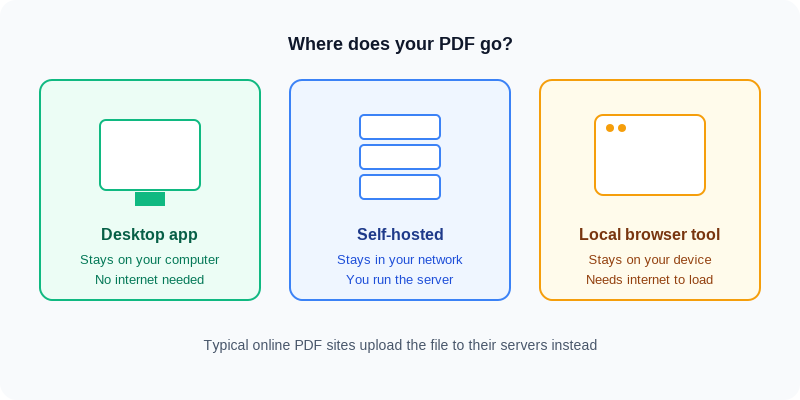
There are three different setups, and they're often lumped together:
- Installed desktop apps. Software you download once. After that it works with no connection at all, and your files never leave the computer.
- Self-hosted tools. A PDF toolkit you run on your own server or PC, then open in a browser. Files stay inside your network, which is what companies with strict data rules usually want.
- Browser tools that process locally. Websites that do the work inside your browser instead of on their servers. You need a connection to open the page, but the file itself is never uploaded.
Typical online services such as Smallpdf and iLovePDF's website are none of these: you upload the file, their servers process it, and you download the result.
Installed Desktop Apps
PDFsam Basic
PDFsam Basic is the best-known free option for page work. Its site describes it as free and open source (AGPL licence), with no watermarks and no file size limit, for Windows, macOS and Linux. It merges, splits (by page, every few pages, by size or by bookmark), rotates, extracts pages and "mixes" files, such as interleaving the odd and even pages from a single-sided scanner. Everything runs locally and no internet connection is needed.
What it doesn't do: compress, convert to Word, or edit text. It's a page-organising tool, and a very good one.
PDF24 Creator
PDF24 Creator is a free Windows program, for private and commercial use. Its FAQ says it works offline and files stay on your PC. It covers far more than PDFsam: merging and splitting, compression, conversion and more. The catch is the platform. The publisher states it can only be installed on Windows, so Mac and Linux users need something else.
iLovePDF Desktop
iLovePDF has its own desktop app for Windows and Mac that processes files offline. Note the pricing, though: at the time of writing (November 2026) the free tier is a PDF reader, and the offline tools come with the paid subscription. If you already pay for iLovePDF Premium, it's worth installing. If you're avoiding a subscription, it isn't the answer.
What's already on your computer
- Mac Preview combines PDFs, reorders and deletes pages, adds text and signatures, and can reduce file size, all offline.
- LibreOffice (free, Windows, Mac and Linux) can export almost any document to PDF and open PDFs in its Draw program for basic editing.
Self-Hosted: Stirling-PDF
Stirling-PDF is an open-source PDF platform you run yourself, either as a desktop app or on your own server with Docker, then use from a browser. It advertises more than 50 PDF tools. It's popular with IT teams who want "iLovePDF, but inside our network".
The licensing is worth reading before a company rolls it out: the project calls itself open-core, with most of the code under the MIT licence and some directories under separate licences.
Browser Tools That Don't Upload
The last group sits between a website and an app. Alventra's PDF tools are an example. You open the page like any website, but the PDF is read and rebuilt by your own browser using the open-source pdf-lib library, so the file doesn't leave your device. There's nothing to install and no account, and it works the same on a phone.
To be precise about "offline": you need a connection to open the page, and the first time you click a button the browser fetches the PDF library. Your files never travel, but the tool itself does.
Alventra currently has eight PDF tools: Merge, Split, Compress, Rotate, Remove Pages, Add Page Numbers, Watermark and Images to PDF. It doesn't convert PDFs to Word, run OCR on PDFs, or edit existing text, and its compressor rebuilds the file structure rather than re-encoding images, so it won't shrink heavy scans much. For those jobs, PDF24 Creator or a full editor is the better pick.
Side-by-Side
| Option | Platforms | Works with no internet | Cost | Best for |
|---|---|---|---|---|
| PDFsam Basic | Windows, Mac, Linux | Yes | Free, open source | Merging, splitting, page reordering |
| PDF24 Creator | Windows only | Yes | Free | All-round PDF work on Windows |
| iLovePDF Desktop | Windows, Mac | Yes | Paid for the tools | Existing iLovePDF subscribers |
| Stirling-PDF | Self-hosted | Inside your own network | Open-core | Teams with data-handling rules |
| Mac Preview | Mac | Yes | Built in | Quick merges, signing, reordering |
| Alventra PDF tools | Any browser, including phones | Needs a connection to load; files stay on device | Free, no account | Quick page jobs on any device |
How to Check Whether a Tool Uploads Your File
You don't have to take any website's word for it, including ours. Two simple tests:
- Watch the network. Open your browser's developer tools (F12 on most desktop browsers), go to the Network tab, then run the tool. If you see a request the size of your PDF going out, the file was uploaded.
- Pull the plug. Load the tool page, run it once on a test file, then switch off Wi-Fi and run it again with your real file. A tool that processes locally keeps working. One that relies on a server fails.
Which One Should You Use?
- You hit a free limit and just need to merge or split now: a browser tool that processes locally, or PDFsam Basic if you'll do it often.
- You need compression and conversions, on Windows, offline: PDF24 Creator.
- You're on a Mac: start with Preview. Add PDFsam Basic for heavier page work.
- You manage PDFs for a team with strict data rules: look at Stirling-PDF.
- You already pay for iLovePDF: install its desktop app and keep your workflow.
Frequently Asked Questions
Is there a free iLovePDF alternative that works offline?
Yes. PDFsam Basic is free, open source and runs offline on Windows, macOS and Linux for merging, splitting and rotating. PDF24 Creator is free and works offline on Windows, with more tools including compression.
What is the best free Smallpdf alternative?
It depends on the job. For merging and splitting without uploading files, PDFsam Basic or a browser tool that processes files locally works well. For an all-in-one free toolkit on Windows, PDF24 Creator covers most of what Smallpdf does.
Do browser-based PDF tools work without internet?
They need a connection to load the page. Tools that process files locally, such as Alventra's, don't upload your PDF, but they aren't fully offline. For no internet at all, use an installed app.
How can I tell if an online PDF tool uploads my files?
Open your browser's developer tools, switch to the Network tab and run the tool. An upload shows up as a request roughly the size of your file. You can also load the page, turn off your connection, and see whether the tool still works.