
 By
VAT Invoice Requirements: UK, EU and Saudi Arabia
What a VAT invoice must show in the UK, the EU and Saudi Arabia, how to work out VAT from a total, and when a free invoice template is not allowed.
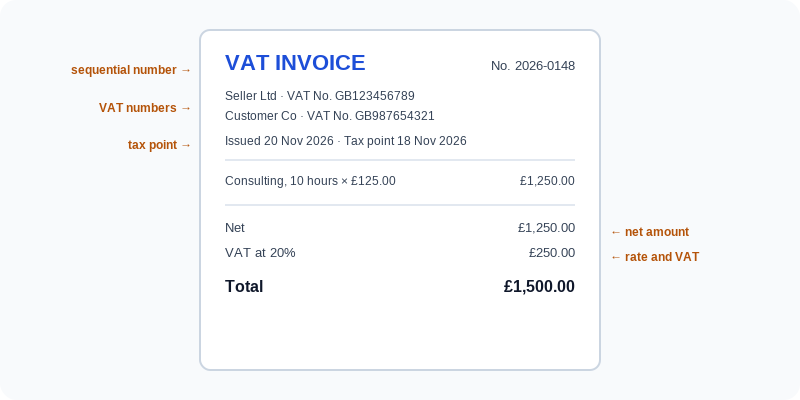
An ordinary invoice asks a customer to pay. A VAT invoice does more: it's the document your VAT-registered customer uses to reclaim the VAT they paid you, and the one a tax inspector checks first. That's why the rules about what it must show are strict, and why they differ from country to country.
This guide covers the three systems people ask us about most: the United Kingdom, the European Union and Saudi Arabia. It ends with an honest note on when a free invoice tool, including ours, is the right choice and when it isn't.
This is general guidance, not tax advice. Rules change, so check the official sources linked here or ask an accountant before you rely on them.
First, Get the VAT Arithmetic Right
Two calculations cover almost every invoice.
Adding VAT to a net price: VAT = net × rate ÷ 100.
A UK consultant bills 10 hours at £125. Net £1,250, VAT at 20% is £250, total £1,500.
Finding the VAT inside a VAT-inclusive total: VAT = gross × rate ÷ (100 + rate).
| Rate | Fraction of the gross that is VAT | Example |
|---|---|---|
| 20% (UK standard) | 1/6 | £1,500 includes £250 VAT |
| 19% (Germany standard) | 19/119 | €595 includes €95 VAT |
| 15% (Saudi Arabia standard) | 3/23 | SAR 1,150 includes SAR 150 VAT |
| 5% (UK reduced) | 1/21 | £105 includes £5 VAT |
The classic mistake is to take 20% of the gross. On £1,500 that gives £300, which is wrong by £50. The Percentage Calculator is handy for checking these by hand.
United Kingdom
HMRC sets out the rules in VAT Notice 700, section 16.
What a full VAT invoice must show
- A sequential number, based on one or more series, that uniquely identifies the invoice
- The time of supply (tax point), and the date of issue if it's different
- Your name, address and VAT registration number
- Your customer's name and address
- A description that identifies the goods or services
- For each description: the quantity or extent, the VAT rate, and the amount excluding VAT
- The total amount excluding VAT
- The rate of any cash discount offered
- The total amount of VAT
- The unit price, where it applies
Two details catch businesses out. The net amounts can be in any currency, but the total VAT must be shown in sterling (paragraph 16.4). And HMRC expects you to issue the invoice within 30 days of the tax point in normal circumstances (paragraph 16.2.3).
Simplified invoices for small sales
For a supply of £250 or less, where your customer agrees, you can issue a simplified invoice instead (paragraph 16.6.1). It must show your name, address and VAT number, the time of supply, a description of the goods or services, and for each VAT rate the total payable including VAT and the rate. Retailers must still issue a full invoice if a customer asks for one.
European Union
EU countries all start from the same law, the VAT Directive (2006/112/EC). Its Article 226 lists what a full invoice must contain, and the list will look familiar:
- Date of issue and a sequential number that uniquely identifies the invoice
- The supplier's VAT identification number, and in certain cases the customer's (for example on cross-border sales between businesses)
- Full names and addresses of both supplier and customer
- Quantity and nature of the goods or extent of the services
- Date of supply, if different from the invoice date
- Taxable amount per rate, unit price excluding VAT, and any discounts
- VAT rate applied and VAT amount payable
- Where no VAT is charged, the reason, such as "Reverse charge" for many business-to-business services between EU countries
Each country writes these into its own law and adds local rules on language, rounding, e-invoicing and archiving. The Directive also lets countries allow simplified invoices for small amounts (Article 238). Check your own tax authority's page for the threshold and any national extras.
Saudi Arabia
Saudi Arabia is the one where people most often get caught out, because the question isn't only what goes on the invoice but how the invoice is produced.
Two kinds of invoice
ZATCA, the Zakat, Tax and Customs Authority, distinguishes:
- Tax invoices, usually issued business to business (B2B), containing all the tax invoice elements.
- Simplified tax invoices, usually issued to consumers (B2C).
The standard VAT rate is 15%.
E-invoicing is mandatory
Under ZATCA's e-invoicing rules (known as FATOORAH), Phase 1 took effect on 4 December 2021. From that date, according to ZATCA's own e-invoicing FAQ, businesses subject to the regulation must use compliant electronic systems to generate invoices, and manual invoices are no longer considered compliant tax invoices.
Phase 1 also added fields:
- Simplified tax invoices must carry a QR code. When scanned, it must show at least the seller's name, the seller's VAT registration number, the date and time of the invoice, the VAT total, and the invoice total including VAT. ZATCA doesn't provide the code; your e-invoicing system generates it.
- Tax invoices must show the buyer's VAT number if the buyer is VAT registered. The QR code is optional on these in Phase 1.
The system itself must not allow certain "prohibited functionalities", such as anonymous access with no user management, tampering with issued invoices, or more than one invoice number sequence.
Phase 2, the integration phase, has been enforced since 1 January 2023 in waves, with ZATCA notifying each group of businesses at least six months ahead. According to ZATCA's simplified e-invoicing guide, Phase 2 invoices are generated in XML or PDF/A-3 with embedded XML, the system is integrated with ZATCA's Fatoora portal, tax invoices are cleared by ZATCA before they go to the buyer, and simplified invoices are reported within 24 hours.
What this means in practice
If you're VAT registered in Saudi Arabia, a Word template, a spreadsheet or a free online invoice generator is not a compliant way to issue tax invoices. You need an e-invoicing solution that meets ZATCA's requirements. ZATCA's guidance points businesses to solution providers or their own technical teams. That applies to our Invoice Generator too: it's a quick way to make a clean, printable invoice, but it isn't a ZATCA e-invoicing system and doesn't produce the required QR code or XML.
Making a UK or EU VAT Invoice With a Free Tool
Outside regimes like Saudi Arabia's, a simple tool is fine for a small business or freelancer, as long as the invoice ends up showing everything listed above. Here's how to get there with the Invoice Generator, which runs in your browser and saves the invoice as a PDF through your browser's print dialog:
- Replace the invoice number. The tool suggests a random number like INV-0427 to get you started. VAT rules need a sequential series, so type your next number in your own sequence instead.
- Add your VAT number. There's no separate VAT field, so put "VAT No." and your number on the address line in the From section. Do the same for your customer's VAT number where it's required.
- Write clear descriptions. "Website maintenance, October 2026, 10 hours" beats "Services".
- Enter one VAT rate. The tax rate applies to the whole subtotal and shows on the invoice as a separate line with the amount. If one invoice needs two different rates, this tool can't show the split per rate, so issue separate invoices or use accounting software.
- Check the currency. The tool offers $, €, £, ¥ and ₹. For a UK invoice in another currency, the VAT total still has to appear in sterling, so add it in the notes.
- Add the tax point in the notes if it differs from the invoice date, along with any reason for zero VAT, such as "Reverse charge".
Keep a copy of every invoice you issue. In the UK, Notice 700 requires VAT-registered businesses to keep copies of the VAT invoices they issue.
A Quick Checklist Before You Send
- ☐Sequential invoice number, not reused
- ☐Your VAT number, and the customer's where required
- ☐Invoice date, plus tax point if different
- ☐Clear description, quantity and unit price
- ☐Net amount, VAT rate and VAT amount, per rate
- ☐Total VAT in the currency your tax authority requires
- ☐A reason shown for any zero-rated, exempt or reverse-charge line
- ☐For Saudi Arabia: issued from a ZATCA-compliant e-invoicing system
Frequently Asked Questions
What must a VAT invoice include?
In the UK and EU, a full VAT invoice needs a unique sequential number, the issue date and tax point, the supplier's name, address and VAT number, the customer's name and address, a description of the goods or services with quantities, the net amount, the VAT rate and the VAT amount. Some cases also need the customer's VAT number.
How do I calculate VAT from a total that already includes it?
Multiply the total by the rate and divide by 100 plus the rate. At 20%, that is one-sixth of the total: £1,500 includes £250 of VAT. At 15%, it is 3/23 of the total: SAR 1,150 includes SAR 150.
Can I use a free invoice template for Saudi VAT invoices?
Not if you are subject to ZATCA's e-invoicing regulation. Since 4 December 2021, tax invoices must be generated by a compliant electronic system, and simplified tax invoices must carry a QR code with set fields. Templates and generic generators don't meet these requirements.
Does a VAT invoice need a sequential number?
Yes, for a full VAT invoice in the UK and EU. The number must come from a sequence that uniquely identifies each invoice.