
 By
Is an Online Password Generator Safe? How to Check
Can a website see the passwords it generates? Three checks that tell a safe generator from a risky one, plus how long and random a password needs to be.
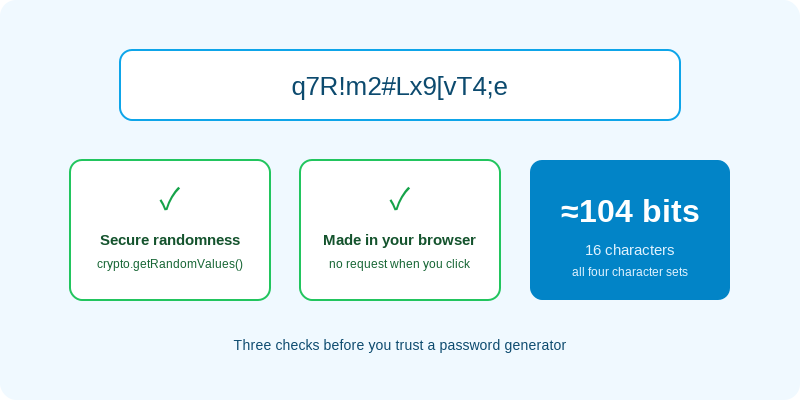
It's a fair question. You're about to protect your bank or email account with a string of characters that a website just made up for you. What stops that website from keeping a copy?
The honest answer: for a badly built generator, nothing. For a well-built one, the password never leaves your device, and you can check that yourself in about two minutes. Here's what to look for.
What Could Go Wrong
A password generator can let you down in three ways:
- It sends the password somewhere. The password is created on a server, or created in your browser and then logged or sent back for "analytics".
- It isn't really random. Ordinary random-number functions are fine for shuffling a playlist, but some are predictable enough that an attacker who knows the method can narrow down the guesses.
- The page itself is compromised. A generator page stuffed with third-party scripts gives more code a chance to read what's on the screen.
The checks below cover all three.
Check 1: Is the Password Made in Your Browser?
A safe generator does all its work in the page you're looking at. You can confirm it two ways:
- The network test. Open your browser's developer tools (F12 on most desktop browsers), choose the Network tab, clear it, then click Generate a few times. Ads and analytics on a page can make background requests at any moment, so look for something more specific: a request that fires every time you click. If there isn't one, the password was made locally.
- The offline test. Load the generator, turn off Wi-Fi or switch on airplane mode, and click Generate. A local generator keeps working. One that relies on a server fails or freezes.
If a generator fails either test, close it. There's no good reason for a password generator to need a server.
Check 2: Is It Using Proper Randomness?
Browsers offer two very different sources of random numbers:
- Math.random() is fast and fine for games. MDN's documentation says plainly that it does not provide cryptographically secure random numbers and must not be used for anything related to security.
- crypto.getRandomValues() is the browser's cryptographically secure generator, built for exactly this job.
You can't see which one a site uses by looking at the page, but you can often find out. Open-source generators show their code. Others say so on the page. If a site won't tell you how it generates passwords, assume the worst.
For transparency, here's how Alventra's Password Generator works. It fills an array with values from crypto.getRandomValues(), then maps each value to a character from the sets you've switched on. With every set enabled that's 89 characters: 26 uppercase letters, 26 lowercase letters, 10 digits and 27 symbols. Mapping a 32-bit random value onto 89 characters can't be perfectly even, but the difference between the most and least likely character is less than 1 in 48 million, which is far too small to help an attacker. It generates up to 20 passwords at once, from 4 to 64 characters long, and nothing is sent anywhere.
Check 3: Is the Page Clean?
This is the least obvious risk and the hardest to rule out completely. Most free sites, Alventra included, carry ads and analytics scripts from other companies, and any script on a page can in principle read what's on the screen. Practical habits help:
- Use a generator from a site you'd trust with other things, not the first result with a pop-up.
- Better still, use the generator built into your password manager or browser. Then the password goes straight into your vault and never touches your clipboard.
- If you do copy a password, paste it where it's going right away, and copy something else afterwards so it isn't left sitting in your clipboard.
How Strong Does a Generated Password Need to Be?
Strength is measured in bits of entropy: how many guesses an attacker would need, written as a power of two. For a randomly generated password it's easy to work out: length × log2(number of possible characters).
| Length | Lowercase and digits (36) | Letters and digits (62) | All four sets (89) |
|---|---|---|---|
| 8 | 41.4 bits | 47.6 bits | 51.8 bits |
| 12 | 62.0 bits | 71.5 bits | 77.7 bits |
| 16 | 82.7 bits | 95.3 bits | 103.6 bits |
| 20 | 103.4 bits | 119.1 bits | 129.5 bits |
Two things jump out. Length matters more than symbols: a 20-character password of just lowercase letters and digits is about as strong as a 16-character one using every symbol. And every extra bit doubles the work.
To put the numbers in perspective, imagine a stolen password database protected by a fast hash, and an attacker testing 100 billion guesses a second. Under those assumptions:
- 8 characters, lowercase and digits (41.4 bits): every combination tried in about 30 seconds.
- 12 characters, all four sets (77.7 bits): about 78,000 years to try every combination.
- 16 characters, all four sets (103.6 bits): trillions of years.
Real attacks vary, and well-run sites use slow hashes that cut the guess rate enormously. But the shape of the table doesn't change: short passwords fall fast, and long random ones don't.
What the Current Rules Say
The US National Institute of Standards and Technology updated its digital identity guidelines in 2025 (SP 800-63B-4). For services that follow them:
- Passwords used as the only login factor should be at least 15 characters. Where the password is one of several factors, the minimum is 8.
- Services should accept passwords of at least 64 characters.
- Services shouldn't force mixtures of character types, and shouldn't make you change passwords on a schedule, only when there's evidence of compromise.
In other words, the official advice has caught up with the maths: long and random beats short and complicated.
Good Habits With Generated Passwords
- Use 16 characters or more for anything important, with all sets on unless the site rejects symbols.
- If a site rejects a character, switch the symbols off and add four or five characters of length to make up for it.
- One password per account. A generated password is only safe until you reuse it.
- Store it straight away in a password manager. Nobody should memorise 16 random characters.
- Turn on two-factor authentication for email and banking. It protects you even if a password leaks.
For the passwords you do have to remember, such as your password manager's master password or your computer login, a long passphrase works better. Our guide to creating strong passwords you can remember covers that.
Frequently Asked Questions
Is it safe to use an online password generator?
It is if the generator runs entirely in your browser and uses a cryptographically secure random source. Check by turning off your internet connection after the page loads: a local generator keeps working. Avoid any generator that sends requests when you click Generate.
Can a password generator website see my password?
Only if it creates the password on its server or sends it back from your browser. A generator that works locally never transmits the password, which you can confirm in the Network tab of your browser's developer tools.
How long should a generated password be?
At least 15 characters for passwords used on their own, according to NIST's 2025 guidelines. With all character types on, 16 characters gives about 104 bits of entropy, which is far beyond what can be guessed.
Are symbols necessary in a strong password?
No. Length adds more strength than symbols do. A 20-character password of lowercase letters and digits is about as strong as a 16-character password that uses every character type.