
 By Muhammad Irfan Liaqat
EMI Calculation Formula With Examples
The EMI formula with two worked examples, why early EMIs are mostly interest, how tenure and rate change your EMI, and how to calculate it in Excel.
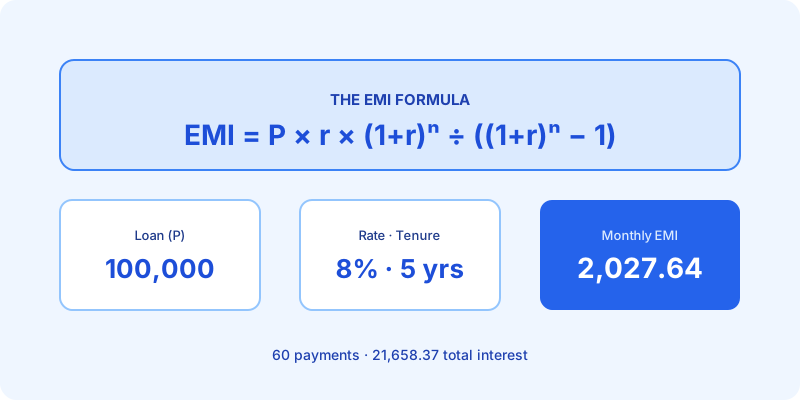
Your EMI (equated monthly installment) is the fixed amount you repay every month until a loan is paid off. Each payment covers that month's interest and pays down part of the principal. The formula looks scary, but it only needs three numbers: how much you borrowed, the interest rate, and how many months you have to repay.
The EMI Formula
EMI = P × r × (1 + r)^n ÷ ((1 + r)^n − 1)
Where:
- P is the principal, the amount you borrow
- r is the monthly interest rate: the annual rate divided by 100, then by 12
- n is the number of monthly payments: years × 12
This is the standard formula for a loan repaid in equal monthly payments, as set out in the Wikipedia entry on EMI. It assumes the interest rate stays the same for the whole loan.
The one mistake to avoid: r must be the monthly rate. Plugging in 8 instead of 0.0066667 gives a nonsense answer.
Worked Example: A 5-Year Loan
Say you borrow 100,000 at 8% a year for 5 years.
- Monthly rate: r = 8 ÷ 100 ÷ 12 = 0.0066667
- Number of payments: n = 5 × 12 = 60
- Growth factor: (1 + r)^n = 1.0066667^60 = 1.489846
- Top of the formula: P × r × 1.489846 = 993.23
- Bottom of the formula: 1.489846 − 1 = 0.489846
- EMI: 993.23 ÷ 0.489846 = 2,027.64
Over 60 months you pay 121,658.37 in total, so the loan costs 21,658.37 in interest.
Worked Example: A 20-Year Home Loan
Now a bigger loan: 5,000,000 (50 lakh) at 8.5% for 20 years.
- r = 8.5 ÷ 100 ÷ 12 = 0.0070833
- n = 20 × 12 = 240
- EMI = 43,391.16
Total repaid: 10,413,878.80. Total interest: 5,413,878.80. Over 20 years the interest is more than the amount you borrowed.
Why Your First EMIs Are Mostly Interest
Each month, interest is charged on the balance you still owe. At the start that balance is at its highest, so interest takes most of the payment.
In the home loan above, the first EMI of 43,391.16 splits like this:
- Interest: 5,000,000 × 0.0070833 = 35,416.67
- Principal: 43,391.16 − 35,416.67 = 7,974.50
Across the whole first year you pay 421,182.48 in interest and only 99,511.46 off the loan. The principal part doesn't overtake the interest part until month 143, almost 12 years in.
So if your lender applies extra payments to the principal, paying a little more early in the loan saves far more interest than the same amount paid near the end.
How Tenure and Rate Change Your EMI
A longer loan lowers the EMI but raises the total interest. For the same 5,000,000 at 8.5%:
| Tenure | Monthly EMI | Total interest |
|---|---|---|
| 10 years | 61,992.84 | 2,439,141.33 |
| 15 years | 49,236.98 | 3,862,656.02 |
| 20 years | 43,391.16 | 5,413,878.80 |
| 25 years | 40,261.35 | 7,078,406.25 |
| 30 years | 38,445.67 | 8,840,442.70 |
Going from 20 to 30 years cuts the EMI by about 4,945 a month but adds 3,426,563.90 in interest.
The rate matters too. For 5,000,000 over 20 years:
| Annual rate | Monthly EMI | Total interest |
|---|---|---|
| 7.5% | 40,279.66 | 4,667,118.32 |
| 8% | 41,822.00 | 5,037,280.83 |
| 8.5% | 43,391.16 | 5,413,878.80 |
| 9% | 44,986.30 | 5,796,711.47 |
| 9.5% | 46,606.56 | 6,185,574.25 |
Each half-point adds about 1,540 to 1,620 a month and 370,000 to 389,000 in total interest.
How to Calculate EMI in Excel
Excel's PMT function uses the same formula. Its syntax, from Microsoft's PMT documentation, is:
=PMT(rate, nper, pv)For the home loan above:
=PMT(8.5%/12, 20*12, -5000000)This returns 43,391.16. Two details catch people out:
- Use monthly units for both rate and nper. Microsoft's documentation makes the same point: divide the annual rate by 12 and multiply the years by 12.
- Mind the sign. With a positive loan amount, PMT returns a negative payment (Microsoft's own example shows ($1,037.03)). Enter the loan amount as a negative number, as above, to get a positive EMI.
What the Formula Doesn't Include
The formula gives the EMI on the principal and interest alone. Your lender's figure can differ slightly because of rounding, processing fees or insurance added to the loan, and a floating rate will change the EMI whenever the rate moves. Ask your lender for the repayment schedule to see the exact numbers.
Calculate Your EMI Instantly
Skip the arithmetic with the Loan EMI Calculator. Enter the loan amount, annual rate and tenure in years to see your monthly EMI, total interest, total payment and the split between principal and interest. It works in any currency and runs in your browser.
To see the other side, where you earn the interest, try the Compound Interest Calculator.
Frequently Asked Questions
What is the formula for EMI?
EMI = P × r × (1 + r)^n ÷ ((1 + r)^n − 1), where P is the loan amount, r is the monthly interest rate (annual rate ÷ 12 ÷ 100) and n is the number of months.
Does a longer tenure reduce EMI?
Yes, but you pay more interest in total. On 5,000,000 at 8.5%, going from 20 to 30 years lowers the EMI by about 4,945 a month and adds about 3.4 million in interest.
How do I calculate EMI in Excel?
Use =PMT(annual rate/12, years*12, -loan amount). For 5,000,000 at 8.5% over 20 years that is =PMT(8.5%/12, 240, -5000000), which returns 43,391.16.